SMC on Screener
SMC (Smart Money Concepts) helps you screen stocks using market structure, Order Blocks, Fair Value Gaps, and liquidity sweeps. These concepts help identify structural breaks, potential reaction zones, and price movements that may indicate a change in market direction.
The Screener lets you combine SMC conditions with other technical indicators, price actions, and filters to find stocks matching your criteria.
SMC is available on the chart as a combined SMC Toolkit, which displays all four components together, as well as four individual indicators:
- SMC BOS / CHoCH
- SMC Order Blocks
- SMC Fair Value Gaps
- SMC Liquidity Sweeps
In the Screener, you can select conditions from all four components independently and combine them into a single strategy.
1. Market Structure (BOS / CHoCH)
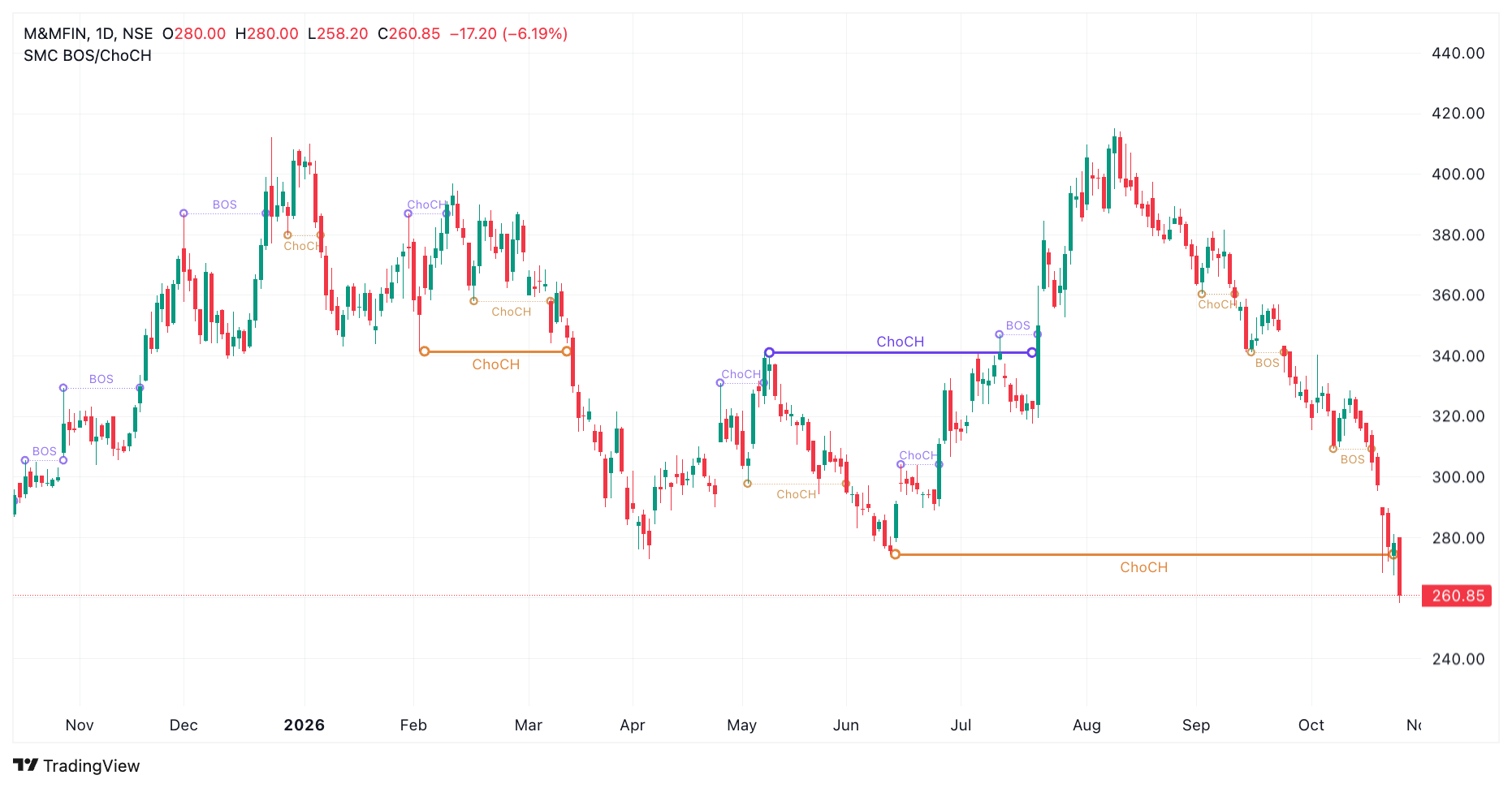
Section titled “1. Market Structure (BOS / CHoCH)”Market structure tracks how price moves through swing highs and lows. The SMC Screener lets you identify bullish and bearish Breaks of Structure (BOS) and Changes of Character (CHoCH).
Break of Structure (BOS) indicates that price has broken a structural level in the direction of the current trend, suggesting possible trend continuation.
Change of Character (CHoCH) indicates that price has broken a structural level against the previous trend, suggesting a possible change in direction.
SMC tracks two layers of market structure:
- External: Tracks larger, major market structure movements.
- Internal: Tracks smaller movements within the larger structure.
How to screen
Section titled “How to screen”Select one of the following conditions:
- Bullish BOS
- Bearish BOS
- Bullish CHoCH
- Bearish CHoCH
Choose the External or Internal layer for the condition. The Screener uses the Exists operator to check whether the selected event occurred on the specified candle.
Example: To find stocks where a bullish BOS occurred on the latest daily candle, select:
- Offset: Latest
- Timeframe: Daily
- Condition: Bullish BOS
- Layer: External
- Operator: Exists
You can change the candle offset, timeframe, event direction, and structure layer to match your screening criteria.
2. Order Blocks
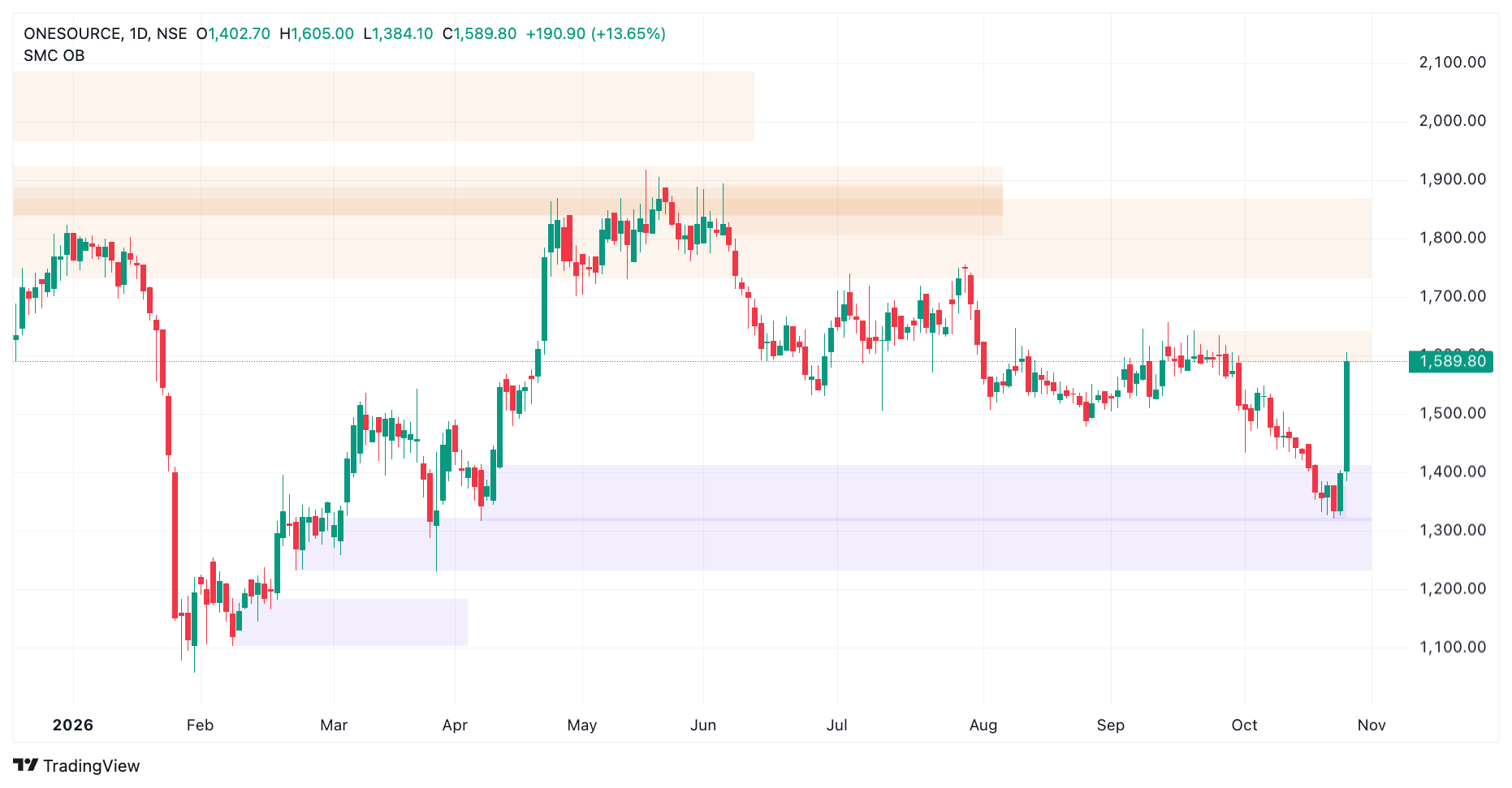
Section titled “2. Order Blocks”An Order Block (OB) is a price zone associated with a structural break and the price move that produced it. Traders often monitor these zones when price returns to them, as they may act as potential reaction areas.
SMC identifies two types of Order Blocks:
- Bullish Order Block: A zone associated with a bullish structural break, which may act as a potential demand area.
- Bearish Order Block: A zone associated with a bearish structural break, which may act as a potential supply area.
Order Blocks are available across two structure layers:
- External: Order Blocks associated with larger structural movements.
- Internal: Order Blocks associated with smaller structural movements.
How to screen
Section titled “How to screen”Select Bullish Order Block or Bearish Order Block, then configure:
- Output: Choose the Upper Edge or Lower Edge of the zone.
- Layer: Choose External or Internal.
The selected edge resolves the Order Block to a price level, which can be compared with another value using operators such as less than or equal to (≤) or greater than or equal to (≥).
Example: To find stocks whose latest daily low has reached the upper edge of an external bullish Order Block, select:
- First expression: Latest · Daily · Low
- Operator: Less than or equal to (≤)
- Second expression: Latest · Daily · Bullish Order Block
- Output: Upper Edge
- Layer: External
This checks whether the latest daily low is at or below the selected Order Block’s upper edge.
You can change the edge, layer, timeframe, and comparison to screen for other Order Block conditions.
3. Fair Value Gaps (FVGs)
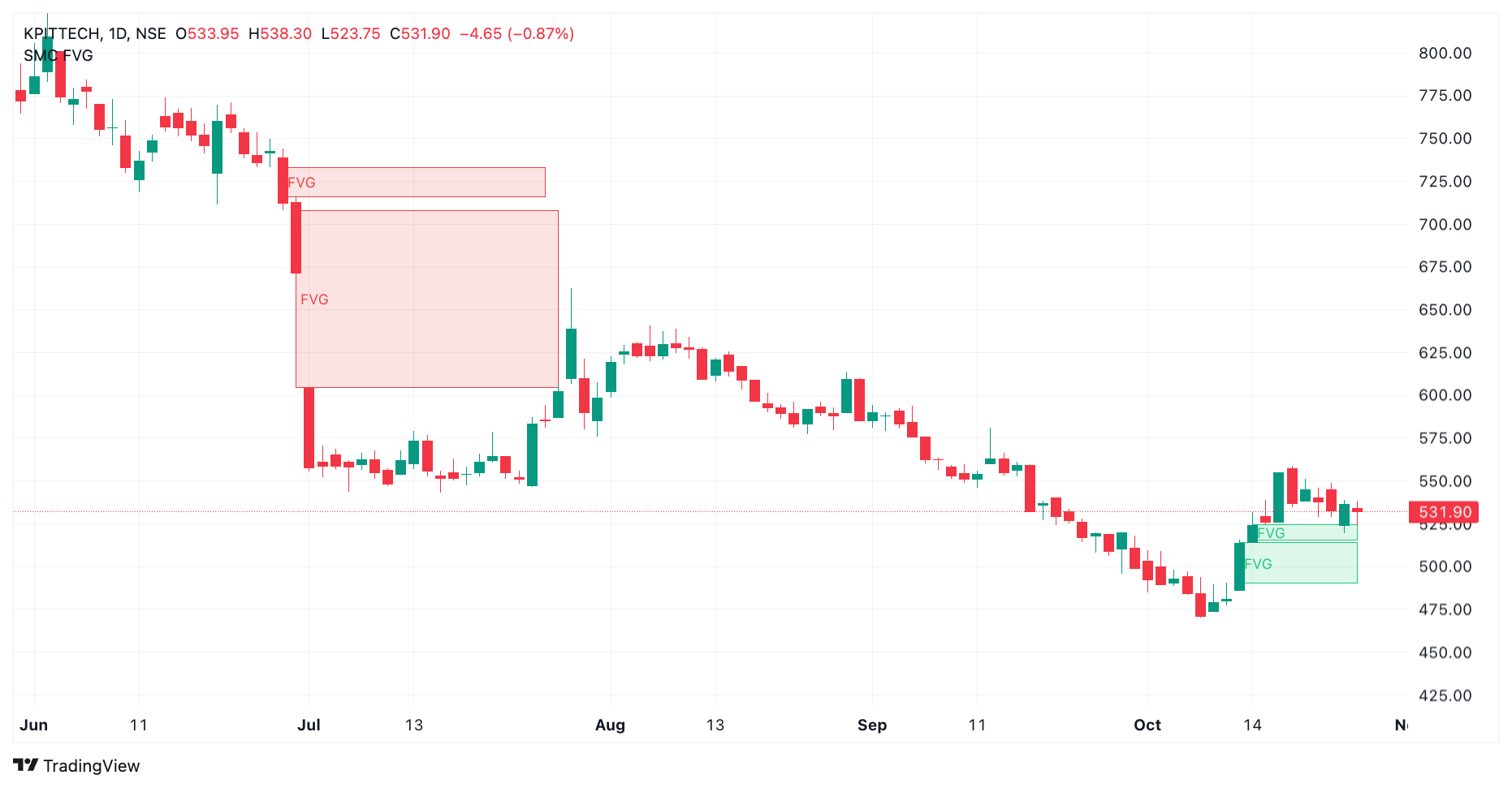
Section titled “3. Fair Value Gaps (FVGs)”A Fair Value Gap (FVG) is a price imbalance formed when a strong price move leaves a gap between the ranges of the first and third candles in a three-candle sequence.
These zones represent areas where price moved quickly. Traders monitor them because price may return to the zone before continuing its move or changing direction.
SMC identifies two types of Fair Value Gaps:
- Bullish Fair Value Gap: An upward price imbalance that may act as a potential support or reaction zone.
- Bearish Fair Value Gap: A downward price imbalance that may act as a potential resistance or reaction zone.
How to screen
Section titled “How to screen”Select Bullish Fair Value Gap or Bearish Fair Value Gap, then choose the output:
- Upper Edge: Resolves to the upper boundary of the gap.
- Lower Edge: Resolves to the lower boundary of the gap.
The selected edge returns a price level that can be compared with another expression using operators such as ≤ or ≥.
Example: To find stocks whose latest daily low has reached the upper edge of a bullish Fair Value Gap, select:
- First expression: Latest · Daily · Low
- Operator: Less than or equal to (≤)
- Second expression: Latest · Daily · Bullish Fair Value Gap
- Output: Upper Edge
This checks whether the latest daily low is at or below the upper edge of the selected bullish gap.
You can use the lower edge or select a bearish Fair Value Gap to screen for different price relationships.
4. Liquidity Sweeps
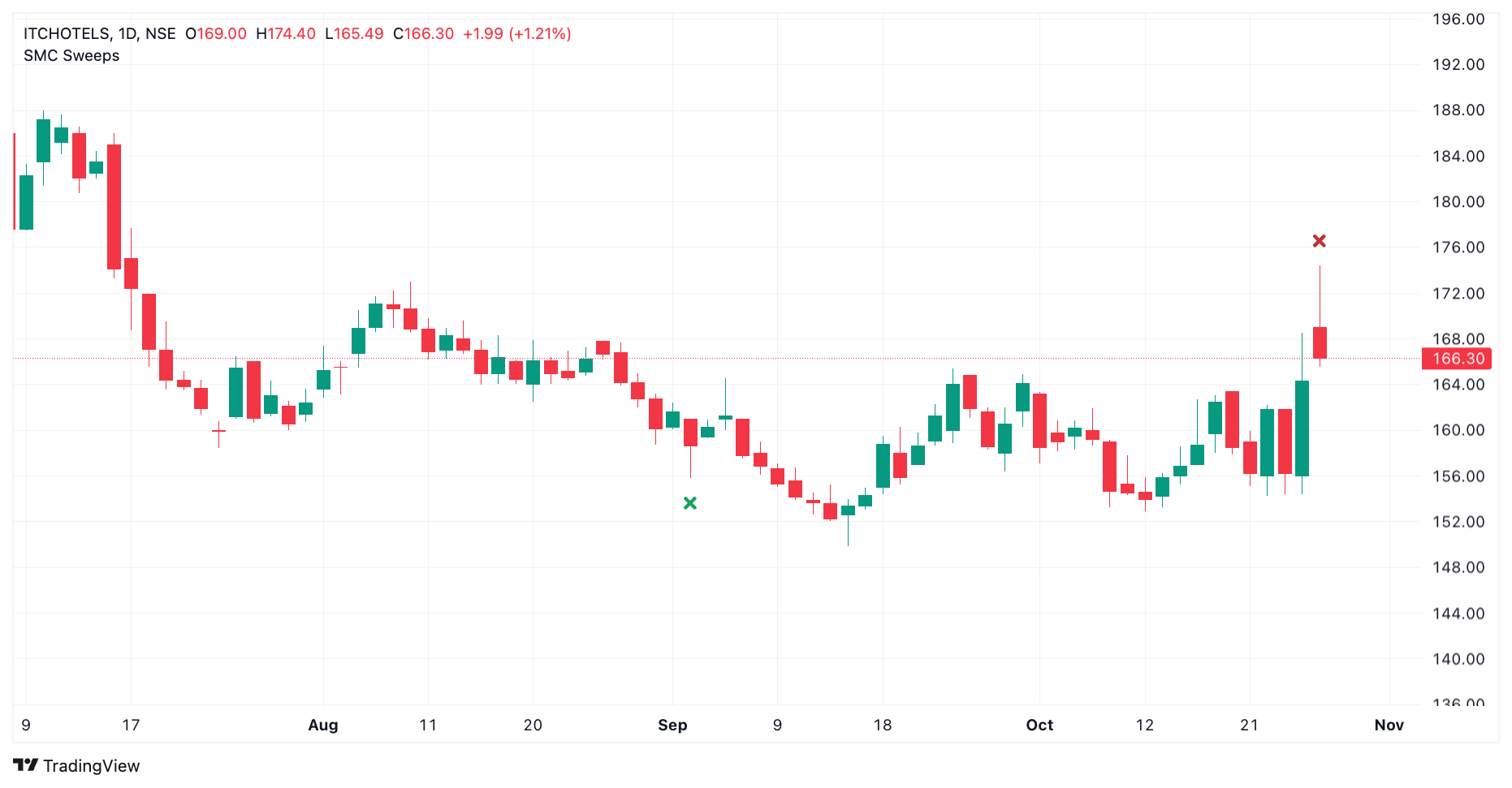
Section titled “4. Liquidity Sweeps”A liquidity sweep occurs when price briefly moves beyond a structural high or low and then closes back on the original side of that level. Such moves may indicate that liquidity around the level has been taken before price reverses.
SMC identifies two types of liquidity sweeps:
- Bullish Liquidity Sweep: Price moves below a structural low and closes back above it, potentially indicating a bullish reversal.
- Bearish Liquidity Sweep: Price moves above a structural high and closes back below it, potentially indicating a bearish reversal.
A sweep differs from a structural break: a sweep closes back beyond the level on the original side, whereas a genuine break closes through the level.
How to screen
Section titled “How to screen”Select one of the following conditions:
- Bullish Liquidity Sweep
- Bearish Liquidity Sweep
The Screener uses the Exists operator to check whether the selected sweep occurred on the specified candle.
Example: To find stocks where a bullish liquidity sweep occurred on the latest daily candle, select:
- Offset: Latest
- Timeframe: Daily
- Condition: Bullish Liquidity Sweep
- Operator: Exists
You can change the candle offset and timeframe to look for sweeps on earlier candles or across different timeframes.
Combining SMC Conditions
Section titled “Combining SMC Conditions”You can combine multiple SMC conditions within the same screening strategy or use them alongside other Screener expressions.
For example, you could screen for stocks where:
- A bullish liquidity sweep occurred on the latest daily candle.
- A bullish CHoCH occurred on the latest daily candle.
- The latest low reached the upper edge of a bullish Order Block.
You can also use OR conditions to include alternative scenarios in your screening strategy.
Combine SMC conditions with other technical filters to build screening strategies around the market structure events and price levels you want to identify.