Sector Momentum
Sector Momentum helps you track how different sectors are performing and identify where market strength and weakness are concentrated.
The page is divided into two sections:
- Sector Leaders: Identify sectors showing positive or negative momentum across different timeframes, along with the stocks leading that momentum.
- Sector Breadth: Examine how widely a particular trend or market condition is reflected across the stocks within each sector, using key technical and performance metrics.
Sector Leaders
Section titled “Sector Leaders”The Sector Leaders section ranks sectors based on their momentum and participation across different timeframes. It also highlights leading stocks within each sector.
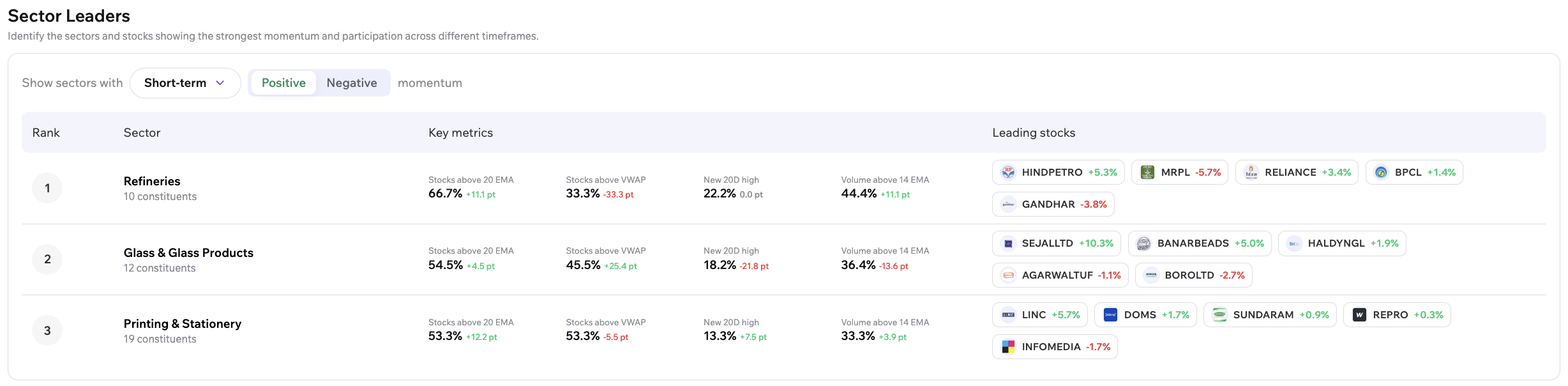
Select a Momentum Timeframe
Section titled “Select a Momentum Timeframe”Use the timeframe dropdown to view sector momentum over different periods:
- Short-term
- Medium-term
- Long-term
You can also select Positive or Negative momentum to focus on sectors showing strength or weakness over the selected timeframe.
Understand Sector Leaders
Section titled “Understand Sector Leaders”The table displays the following information:
- Rank: The sector’s position in the displayed results.
- Sector: The sector name and the number of constituent stocks.
- Key metrics: Indicators showing the sector’s momentum and participation.
- Leading stocks: Stocks within the sector showing their individual price changes.
The key metrics vary by the selected timeframe:
- Short-term: Stocks above 20 EMA, Stocks above VWAP, New 20D high, and Volume above 14 EMA.
- Medium-term: Stocks above 50 EMA, Outperforming Nifty 50 (1M), and New 50D high.
- Long-term: Stocks above 200 EMA, Outperforming Nifty 50 (1Y), and Near 52W high.
Each metric displays the percentage of constituent stocks meeting the condition, along with the change in percentage points.
This helps you compare sectors and assess whether strength or weakness is reflected across their constituent stocks. Leading stocks provide additional context on individual stock performance within each sector.
Sector Breadth
Section titled “Sector Breadth”The Sector Breadth section helps you assess the participation and performance of stocks within each sector using a range of technical and market-performance metrics.
Each row represents a sector, while the columns show how its constituent stocks are performing against selected conditions.
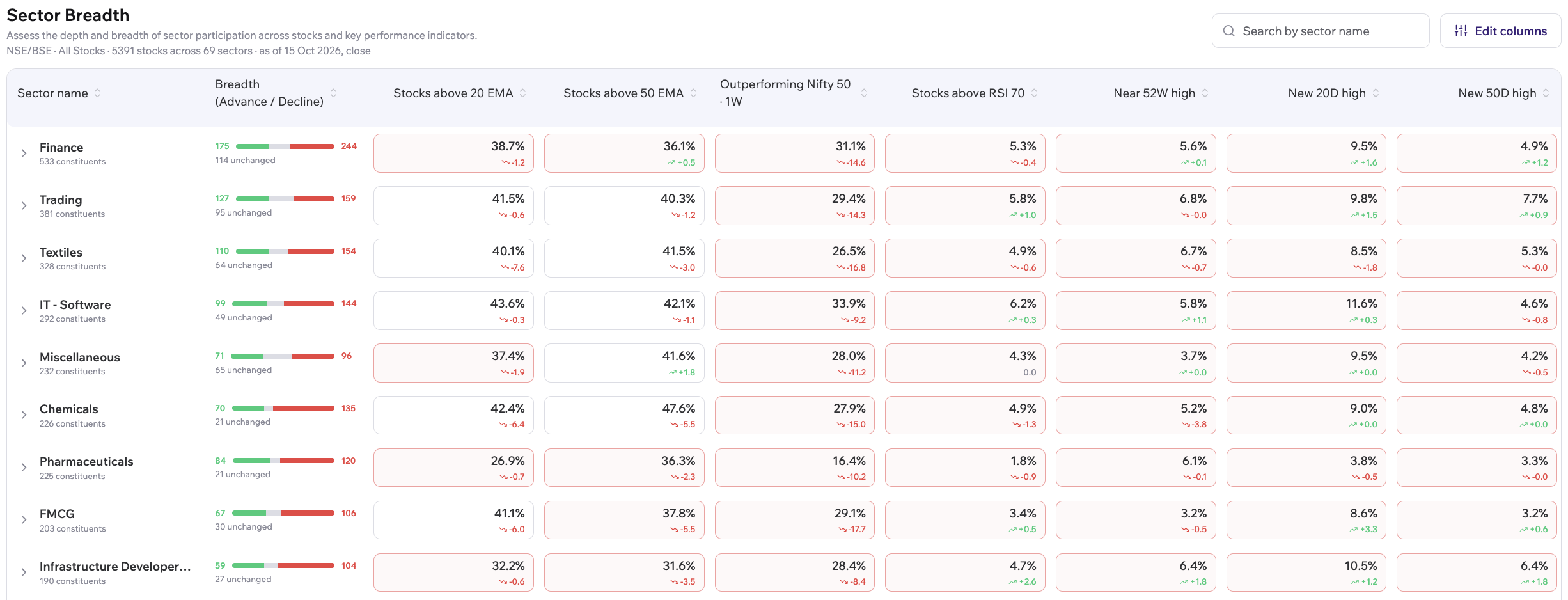
Understand the Sector Breadth Table
Section titled “Understand the Sector Breadth Table”The table displays the following information:
- Sector name: The sector and its number of constituent stocks.
- Breadth (Advance / Decline): Number of stocks advancing, declining, or remaining unchanged.
- Technical and performance metrics: The percentage of constituent stocks meeting specific conditions. Metrics are grouped into categories such as Trend, Relative Strength, RSI Extremes, Highs & Lows, and Momentum.
Search and Customise the Table
Section titled “Search and Customise the Table”Use Edit columns to customise the table by choosing which metrics to display. You can select from 21 metrics across categories such as Trend, Relative Strength, RSI Extremes, Highs & Lows, and Momentum. The table supports between 4 and 12 metric columns at a time.
Use Search by sector name to quickly find a specific sector in the table.

Explore a Sector’s Historical Trend
Section titled “Explore a Sector’s Historical Trend”Click a metric column for a sector to open its detailed view. You can also select a metric directly from the dropdown within this view.
The expanded view includes:
- Constituents matching metric: The number and percentage of stocks within the sector that match the selected metric.
- Top matching stocks: A list of stocks matching the metric, along with their displayed price changes.
- Historical chart: A chart showing how the breadth of the selected metric has changed over time.
For example, selecting Stocks above 20 EMA lets you examine how the percentage of stocks trading above their 20-period EMA has changed within a sector. This can help you understand whether participation in that condition is increasing or decreasing.
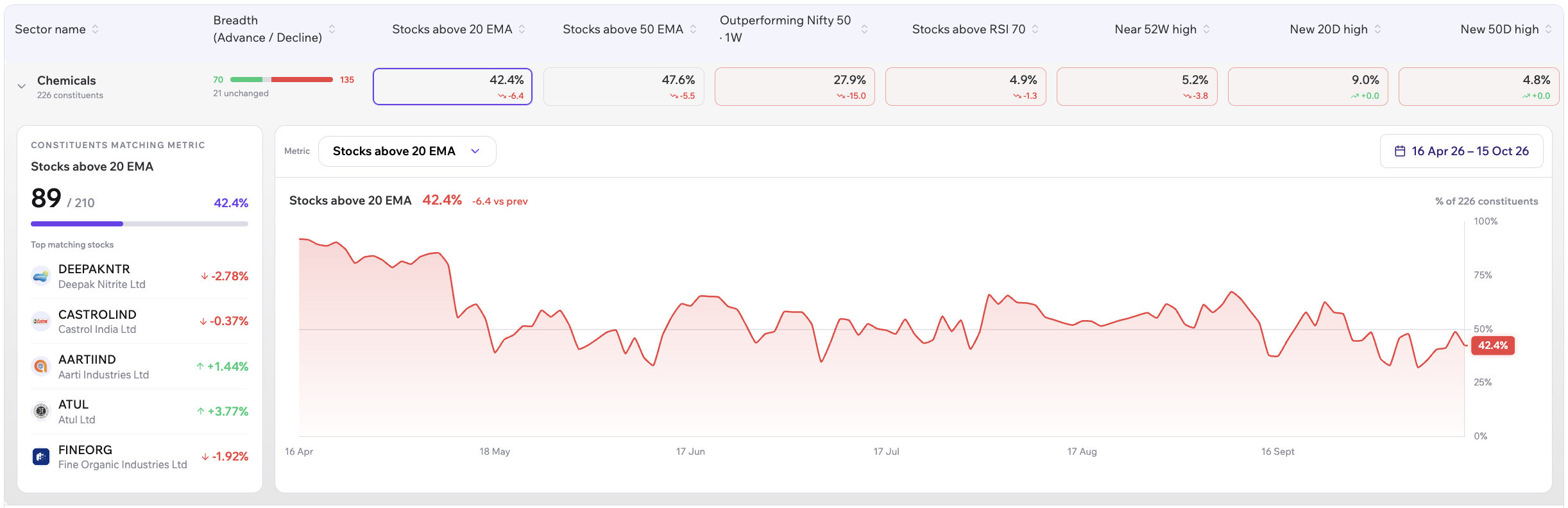
Change the Historical Date Range
Section titled “Change the Historical Date Range”Use the date-range control above the historical chart to choose a period for analysis.
The interface provides preset ranges, including 1M, 3M, 6M, and 1Y, as well as the option to specify custom From and To dates.
The chart displays the historical trend of the selected breadth metric over the chosen period. This helps you compare the current reading with its previous levels and observe how participation has evolved.
What This Helps You Do
Section titled “What This Helps You Do”Sector Momentum helps you:
- Identify sectors showing positive or negative momentum.
- Compare sector strength across short-term, medium-term, and long-term timeframes.
- Identify leading stocks within stronger or weaker sectors.
- Assess whether a market trend is supported by broad participation across a sector.
- Track changes in sector breadth over time.
- Focus on specific technical metrics by customising the table and exploring individual sectors.
By combining sector rankings with constituent-level breadth data, you can examine both where momentum is concentrated and how widely it is shared across stocks.